Session-Driven Development

Over the past few months I’ve been talking with several experienced engineer friends who are deep into what I jokingly call “clauding.”
Everyone is experimenting: different prompts, different workflows, different ways of collaborating with AI.
Some patterns kept coming up in those conversations:
- work in Terminal rather than VS Code
- keep development and testing in separate sessions
- make the AI ask questions until it actually understands the task
- avoid giant conversations that accumulate confusion
- document everything between sessions
That made me curious.
I started experimenting with different workflows myself, researching how other engineers approach AI-assisted development, and trying to understand why some projects work surprisingly well while others quickly turn into chaos.
Eventually I realized something simple.
Most people use AI in development like this:
“Build me a feature.”
And more often than not they end up with a working prototype that is fragile, messy, incomplete, and difficult to release to production or integrate into an existing product.
The problem isn’t the model.
The problem is structure.
Real engineering teams don’t operate inside a single conversation. They operate through roles, phases, and checkpoints. When you remove that structure and ask AI to do everything in one prompt, the process collapses.
So I started experimenting with a simple idea:
What happens if we structure AI development the same way good engineering teams structure their work?
I call this approach Session-Driven Development (SDD).
The Core Idea
Instead of one long AI conversation doing everything, development is split into structured sessions.
Each session has:
- a role
- a goal
- a checklist
- clear outputs
The AI behaves differently depending on the session — architect, engineer, reviewer, QA, and so on.
The Basic Flow
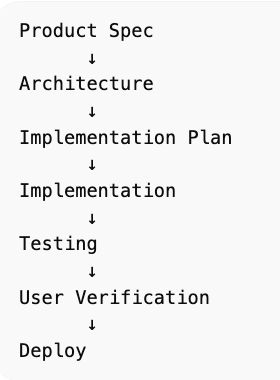
Each stage runs in a separate AI session.
Principles Behind the System
The system has three core components:
- Session templates → the process
- Project documents → the shared knowledge
- Session tracker → the control layer
Together they form a simple operating structure for AI-assisted development.
The workflow itself follows a few basic rules.
1. 95% confidence before implementation
AI should never jump straight to coding.
First it asks questions until it understands the problem with at least 95% confidence.
This prevents the most common failure mode: confidently building the wrong thing.
2. Separate thinking from building
Design decisions happen before implementation.
Three documents are created first:
- product specification
- architecture
- implementation plan
Only after these are approved does coding begin.
3. Small, focused sessions
Each stage runs in a new AI session.
Long conversations accumulate hidden assumptions and errors. Starting fresh forces the AI to reason from the documented state of the system.
4. Session progress tracking
After running the process on a real feature, I added another component: a Session Tracker.
The tracker acts as a control panel for the development process. It tracks:
- which sessions are complete
- where the project is in the cycle
- links to outputs
- the next session to run
This makes the workflow easier to manage across multiple sessions.
5. Explicit approval checkpoints
The workflow includes several hard gates:
- spec approval
- implementation approval
- user verification
- deployment approval
Nothing moves forward automatically.
6. Documentation becomes memory
AI doesn’t remember context between sessions.
So the system relies on a small set of core documents:
docs/product-spec.md
docs/architecture.md
docs/implementation-plan.md
docs/test-plan.md
Each new session reads these files first.
They become the source of truth for the system.
Key Sessions
Product Specification
Define exactly what the system should do.
This includes:
- user stories
- inputs and outputs
- constraints
- failure behavior
- performance expectations
This becomes the contract for the system.
Architecture
Now the AI acts as a software architect.
It explores design options, evaluates trade-offs, and proposes a system design.
Implementation Planning
The architecture is broken down into small tasks.
Each task includes:
- acceptance criteria
- dependencies
- risk level
- effort estimates
This becomes the roadmap for development.
Implementation
Now the AI behaves like a developer.
Rules are simple:
- implement one task at a time
- test after each step
- keep solutions simple
- avoid scope creep
Build Verification
Now the AI becomes a code reviewer.
It checks:
- build success
- type safety
- architecture consistency
- scalability risks
Testing
Now the AI becomes QA.
The goal is not to confirm the system works.
The goal is to break it.
Testing includes:
- invalid inputs
- race conditions
- edge cases
- concurrency issues
- performance stress
User Verification
At this stage the human user takes over.
The user tests the feature and decides whether it is acceptable.
Final Verification
A final quality gate before deployment.
Security, performance, tests, and documentation are reviewed. If anything is uncertain, deployment stops.
Post-Mortem
After deployment, the system analyzes the development cycle:
- what went wrong
- what slowed development
- what bugs escaped testing
- how the process should improve
The workflow itself evolves.
Why This Works
The system essentially simulates a complete engineering team around a single AI model.
Instead of asking AI to do everything at once, the process distributes responsibilities across structured roles.
That structure improves:
- reliability
- reasoning quality
- maintainability
- documentation
But most importantly, it forces clarity where AI struggles most - requirements.
How to Build One Yourself
You don’t need a complicated framework.
Just:
- Create a repo
- Add a /docs folder
- Define session templates and instructions
- Run each phase in a fresh AI conversation
Each session begins with instructions like:
“Act as a senior software architect.”“Act as a QA engineer trying to break the system.”
The structure does the rest.
Repository Structure
This is how my project is organized.
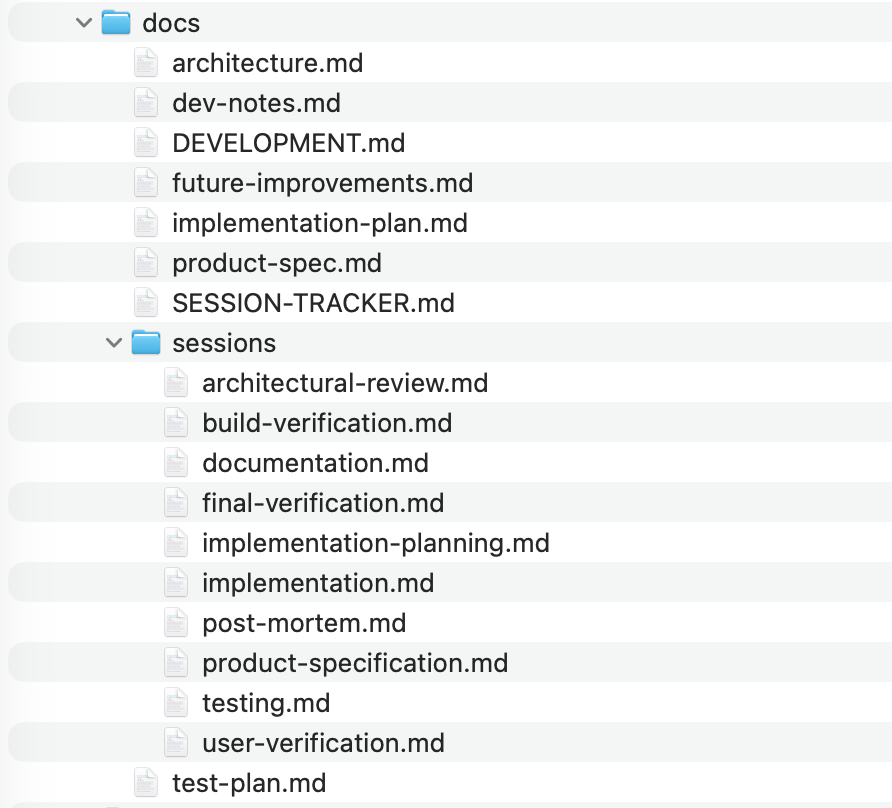
The repository separates session templates from session outputs.
The /sessions folder contains templates that define how each AI session should behave — what questions to ask, what checklist to follow, and what outputs to produce.
The /docs folder contains the artifacts generated during development: product specs, architecture, implementation plans, and other project documentation.
Each session reads the current documents, performs its role, and then updates them.
Final Thought
AI is incredibly powerful.
But it’s not a magic engineer.
It works best inside a well-designed process.
The real shift happening right now isn’t AI replacing developers.
It’s developers learning how to design systems where AI can operate effectively.